Who sees whose requests
Choose whether members see every request, their team's, or only their own.
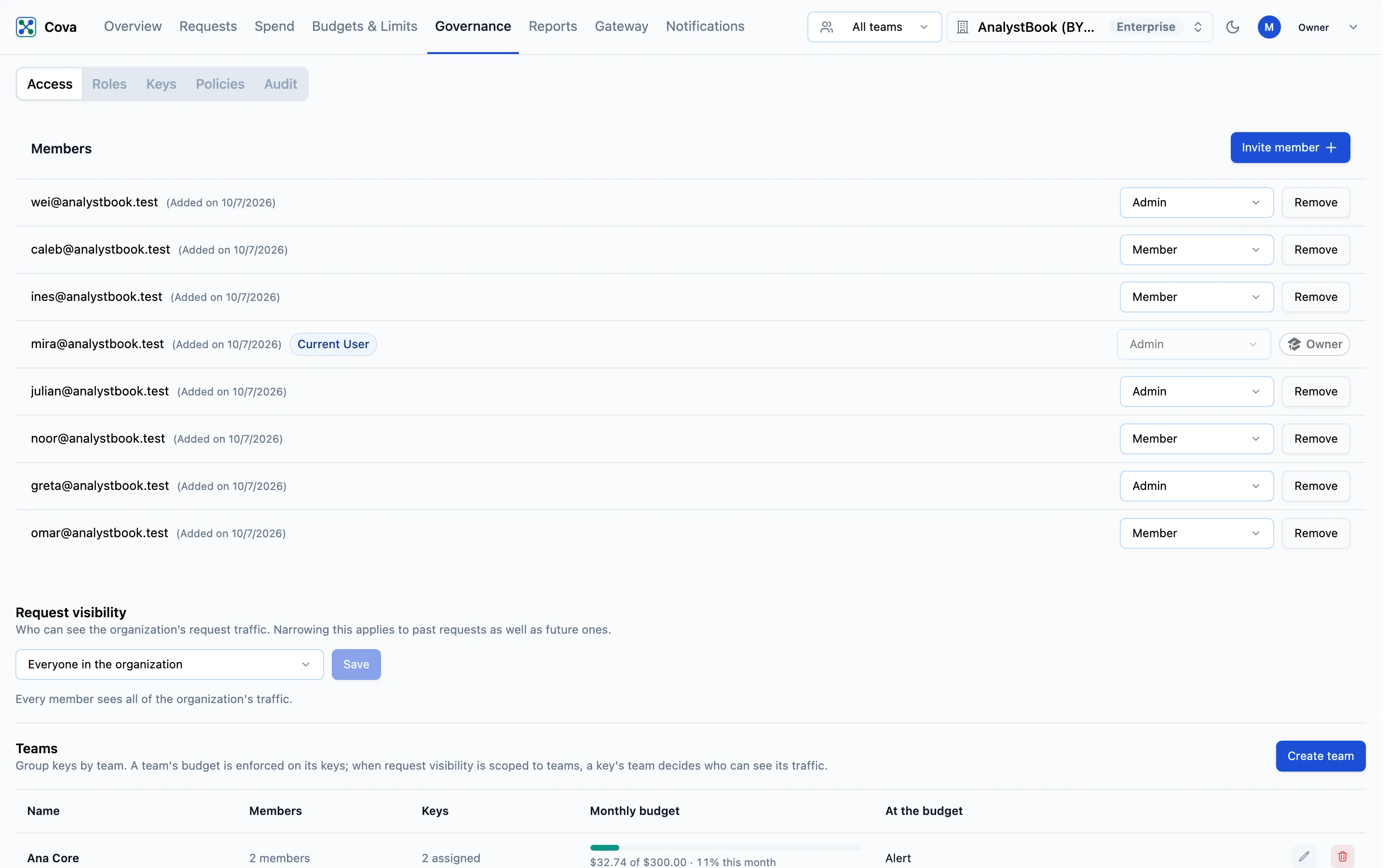
Request visibility decides whose traffic each person in your organisation can see in the console: requests, their details, and the spend and usage views built from them. Every organisation starts with everyone seeing everything. You can narrow it to teams or to individuals.
Before you start
| Requirement | Detail |
|---|---|
| Where | Top bar → Governance → Access, the Request visibility section between Members and Teams. |
| Role | Owner or Admin to narrow it (org.members.write). Only the owner can widen it. |
| Plan | Every plan. |
The three settings
| Setting | Who sees what |
|---|---|
| Everyone in the organization | Every member sees all of the organisation's traffic. The default. |
| Scoped to teams | Members and admins see traffic from the keys of the teams they are on. |
| Scoped to individuals | Members and admins see traffic from the keys they own. |
The owner always sees everything. Admins are scoped like members: an admin on no team sees no traffic under Scoped to teams.
A request belongs to the team its key was on when the request was made. Moving a key to another team changes who sees its future requests; past requests stay with the old team. The Cova-Team-Id header has no effect on visibility.
Narrowing applies to past requests too. As soon as you save, people lose sight of traffic outside their scope, including history they could see before.
Narrow visibility
- Go to Governance → Access.
- Under Request visibility, choose Scoped to teams or Scoped to individuals.
- Read any warning that appears (below), then click Save.
Keys with no team
A narrowed setting needs every key to have a team, so that no traffic is left belonging to nobody. Saving is refused while any key has no team, and the page lists those keys. Fix each one on Governance › Keys: put it on a team, or mark it Org-level key if it is a shared service key that only owners should see.
Keys and webhooks that keep wide access
Two things keep organisation-wide access whatever this setting says, and the page lists them before you save:
- Org-level keys — they can read every team's traffic through the API.
- Webhooks that send request data out of CoreValue.
The owner confirms them by ticking I've reviewed these, and they should keep organization-wide access. An admin cannot narrow visibility while any of these exist: put the keys on teams and turn off request data on the webhooks, or ask the owner.
While visibility is narrowed
- New keys must be put on a team or marked org-level.
- Only the owner can add people to a team, or widen visibility again.
- The top bar's team picker offers only your own teams, unless you are the owner.
- A few organisation-wide views that cannot be split by key are shown to the owner only.
- A member with nothing in scope sees a note on each page — You aren't on a team yet or You don't own any keys yet — explaining why there is nothing to show.
Keys reading through the API
A CoreValue key that reads data from the CoreValue API follows the same setting. An org-level key reads everything. Under Scoped to teams, a key on a team reads its team's traffic. Otherwise a key reads only its own traffic — never its owner's.