Unit economics
What one request, run or end user costs, per team, customer or feature, and whether it is moving.
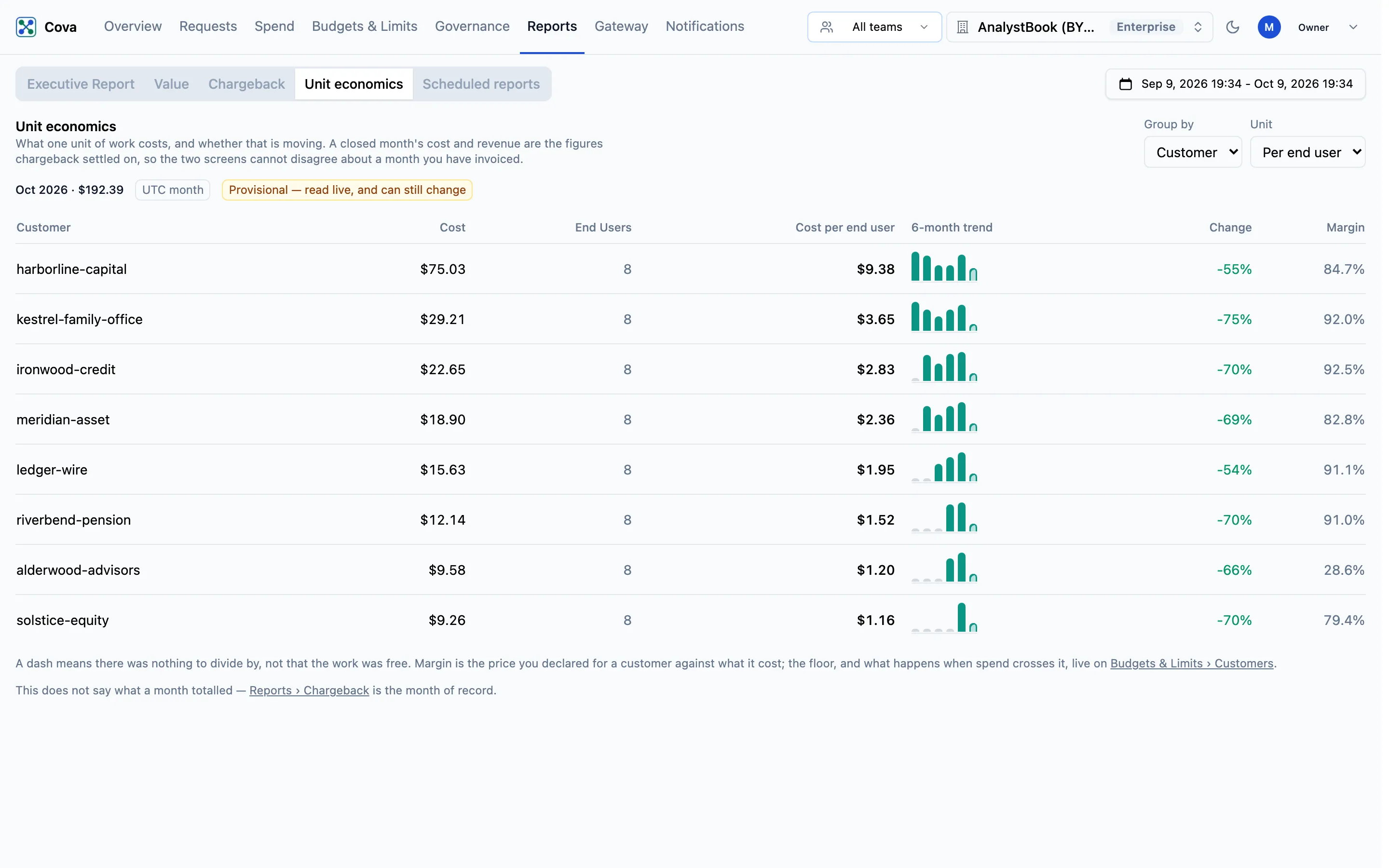
Unit economics divides a month's cost by a unit of work you choose (requests, runs or end users) and shows how that rate has moved over six months. Use it to answer questions like "what does a conversation cost for this customer, and is it going up?", and to see margin beside it.
Before you start
| Requirement | Detail |
|---|---|
| Where | Top bar → Reports → Unit economics (/reports?tab=unit-economics). |
| Role | reports.read, which owners and admins hold. See Roles and permissions. |
| Plan | Every plan. The Margin column needs customer prices, which are Growth and Enterprise. |
Choose the view
| Control | Options |
|---|---|
| Group by | Team: the team of the key that made the request. Customer: the Cova-Customer-Id your application sends. Feature: the Cova-Feature-Id your application sends. |
| Unit | Per request, Per run or Per end user. |
A run is one value of Cova-Session-Id, so a conversation or agent run counts once however many requests it makes. An end user is one value of Cova-User-Id. Both count only requests that carry the header; see Cost attribution.
The page opens on Per end user when your requests carry Cova-User-Id, otherwise Per run when they carry Cova-Session-Id, otherwise Per request. Your own choice then sticks.
Read the table
The line above the table gives the latest month and its total cost, and says whether the month is closed.
| Column | What it means |
|---|---|
| Cost | What the group spent in the month. |
| Requests, Runs or End users | How many of the chosen unit the group had. |
| Cost per request / run / end user | Cost ÷ that count. A dash means there was nothing to divide by, not that the work was free. |
| 6-month trend | The unit cost for each of the last six months. |
| Change | From the first to the last month in the trend that has a unit cost. Red when the unit cost went up. |
| Margin | (Revenue − Cost) ÷ Revenue, where revenue is the customer's declared price shared across rows by cost. A dash means no price applies. |
Spend with no team or no customer appears as — unattributed.
Open and closed months
A month that Chargeback has closed shows Closed — cost and revenue are what chargeback settled on. Cost and revenue for Team and Customer are then the closed figures, so this page agrees with what you invoiced.
Run and end-user counts were never stored at close, so they are always read live. When you look at a closed month Per run or Per end user, a note says the rate can still move while the cost it divides cannot.
An open month shows Provisional — read live, and can still change. Feature is never closed, so every month in that view is read live.
Common tasks
- Spot a customer getting more expensive to serve. Group by Customer, choose Per end user or Per run, and look for red in Change.
- Check a margin. Group by Customer and read Margin. The floor, and what happens when a customer crosses it, are set on Budgets & Limits › Customers.
- Compare features. Group by Feature with Per request to see which parts of your product cost most per call.
Unit economics does not say what a month totalled. Chargeback is the month of record.