Roles and custom roles
Decide what each member can do, with the three built-in roles or, on Enterprise, roles you define.
A role is a set of permissions. Every member has one. Three roles are built in and mean the same thing in every organisation. On the Enterprise plan you can also define your own.
Before you start
| Requirement | Detail |
|---|---|
| Where | Top bar → Governance → Roles (/governance?tab=roles). |
| Role | Anyone can view the matrix. Owner or Admin to create, edit or archive a custom role (org.members.write). |
| Plan | Built-in roles: every plan. Custom roles: Enterprise. On other plans the tab shows the matrix read-only, and New role is disabled. |
Built-in roles
| Role | Holds |
|---|---|
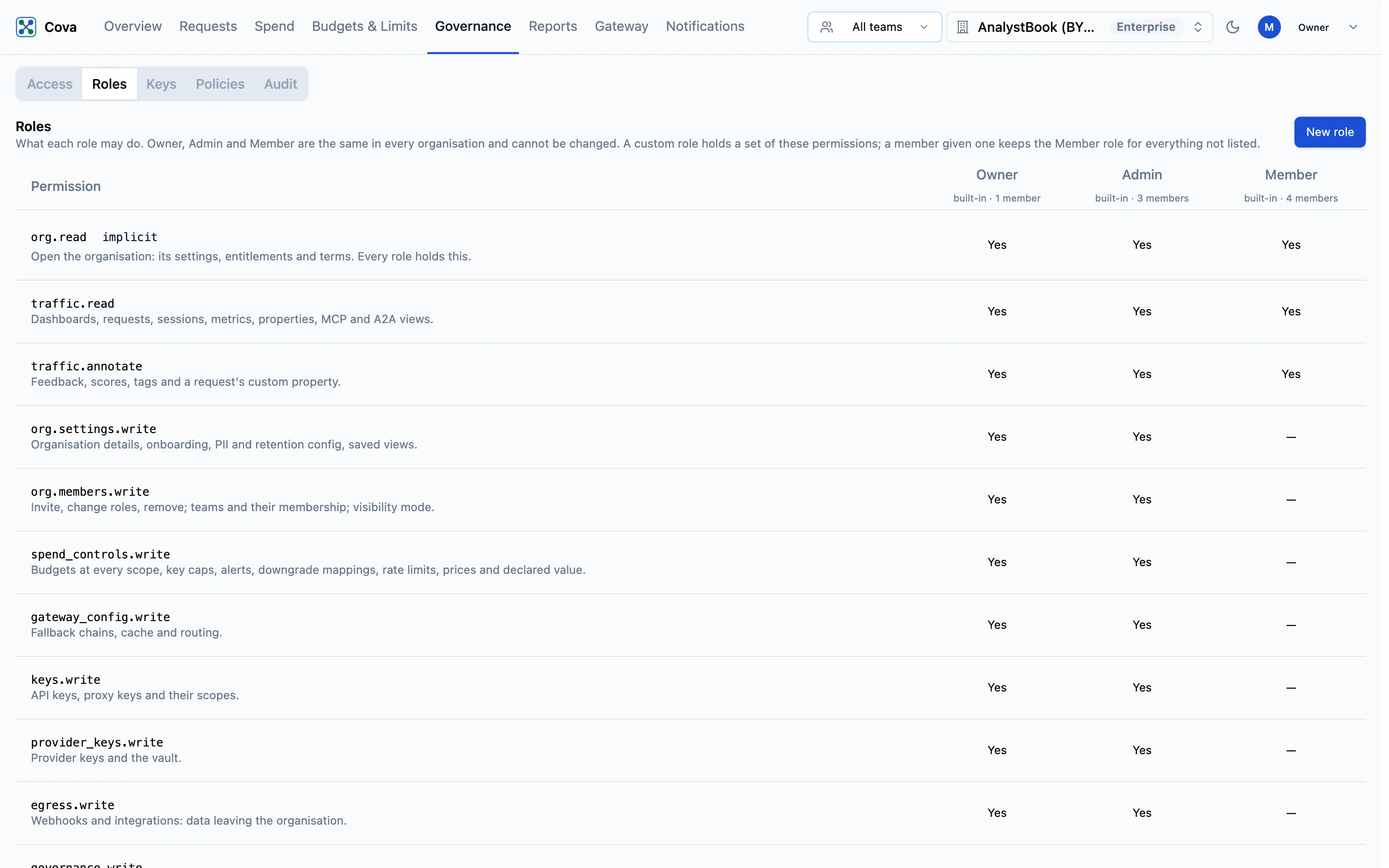
| Owner | Every permission, including ownership: transfer the organisation, delete it, cancel the subscription and remove a payment method. There is one owner; ownership moves only by transfer. |
| Admin | Every permission except ownership. |
| Member | org.read, traffic.read and traffic.annotate: open the console, read requests and spend, and add feedback, scores and tags. |
The built-in roles cannot be edited. Every permission, and the API routes each one unlocks, is listed on Roles and permissions.
Read the matrix
The tab is a table: one row per permission, one column per role. Each column header shows whether the role is built-in or custom, and how many members hold it. A cell says Yes when the role holds that permission. org.read is marked implicit — every role holds it — and ownership is marked owner only.
Create a custom role
A custom role is the Member role plus the permissions you add. Use it to give someone exactly what they need — for example a finance viewer who can read reports but not touch keys.
- Click New role.
- Enter a Name and, optionally, a Description.
- Under Permissions, tick what the role should hold. They are grouped as See, Configure, Credentials and integrations, and People and billing.
- Click Create role.
You can only grant permissions you hold yourself. No custom role can hold ownership.
Give a member a custom role
- For someone already in the organisation, pick the role from the selector on their row in Members.
- When adding someone, choose it as their Role in the Invite a member dialog.
Edit or archive a custom role
Use Edit or Archive under the role's name in the matrix. A change to a role applies to everyone who holds it. A role cannot be archived while any member still holds it: give those members another role first. An archived role leaves the matrix and can no longer be assigned.
If your organisation moves off Enterprise, custom roles already held keep working, but you cannot create or edit them.
API keys have no role
A CoreValue key never inherits the role of the person who created it. A key holds what a member holds and nothing more. Which customers, models and providers a key may use is set separately, with key scopes.
Related
- Roles and permissions — the full permission catalogue
- Members
- Audit log — role changes are recorded there