Chargeback
Split a month's AI spend by team, customer and model, close it, and hand finance a file that adds up.
Chargeback splits one calendar month's spend by team, customer and model. While the month is open it is showback: what each team and customer consumed, read live. Once the month is closed, its figures are frozen, so an invoice raised from it does not move when a late request lands.
For a step-by-step setup (teams, keys, budgets, then this report), see Team chargeback.
Before you start
| Requirement | Detail |
|---|---|
| Where | Top bar → Reports → Chargeback (/reports?tab=chargeback). |
| Role | Viewing and downloading need reports.read. Close month needs spend_controls.write. Owners and admins have both. See Roles and permissions. |
| Plan | Every plan. Revenue and margin need customer prices, which are Growth and Enterprise. |
How spend is split
Each row is one team × customer × model combination for the month.
- Team is the team of the key that made the request, never the
Cova-Team-Idheader. A key with no team counts as — unattributed. - Customer is the
Cova-Customer-Idyour application sends, matched without regard to case. Requests without it count as — unattributed. - Model is the model that served the request.
Unattributed spend is listed, not dropped, so the rows always add up to the month's total. If they ever do not, the page says The rows do not add up to the month's total; do not invoice from this.
Months are UTC calendar months.
Chargeback covers LLM requests. The cost of MCP tool calls and agent calls is not included in its totals yet.
Read the report
| Control | What it does |
|---|---|
| Month | Any of the last twelve months. The page opens on last month if it had spend, otherwise on this month. |
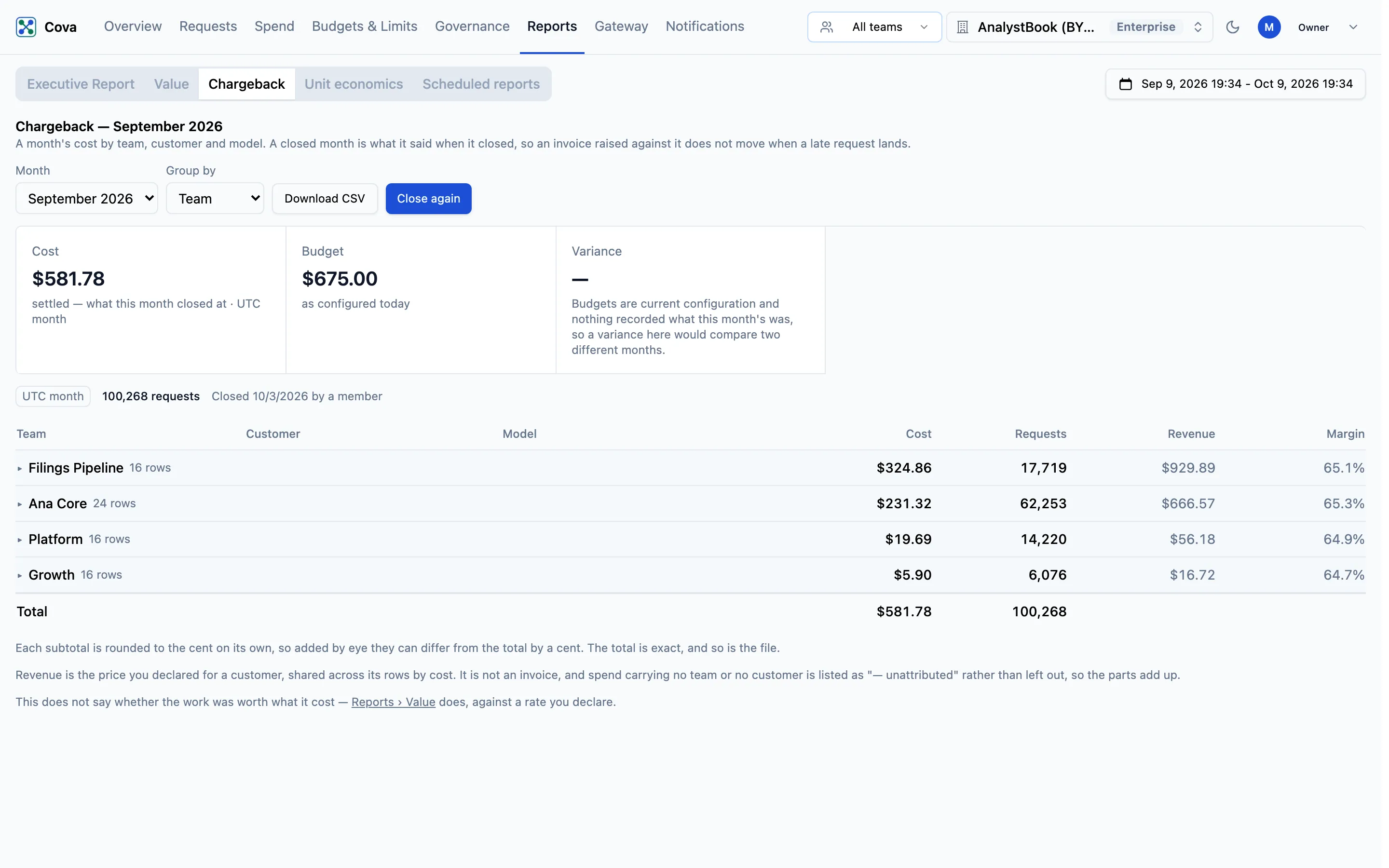
| Group by | Team, Customer, Model or Flat. An open month starts grouped by team, a closed month by customer. Click a group's name to expand its rows. |
| Download CSV | Saves the month's rows. See Export for finance. |
| Close month | Freezes the month. See Close a month. |
The heading reads Showback — September 2026 while the month is open, with the badge Showback — what each team and customer consumed. Nothing is billed. A closed month reads Chargeback — September 2026 and notes when it was closed, and whether by a member or by the monthly job.
Above the table, Cost is the month's total, with Budget and Variance when an organisation budget is set. Variance is shown for the current month only.
| Column | What it means |
|---|---|
| Cost | What the requests cost. |
| Requests | How many requests. |
| Revenue | The customer's declared price for the month, shared across its rows in proportion to cost. A dash means the customer has no price. |
| Margin | (Revenue − Cost) ÷ Revenue. A group margin marked * covers only the priced rows in the group; unpriced cost is left out of it rather than counted as free. |
Revenue is what you declared a customer pays, not an invoice. For how it is calculated, see Customer pricing and margin.
On an open month, a line above the table names any customer whose margin is below the floor on their own price.
Close a month
- Choose the Month.
- Check the rows, especially — unattributed spend.
- Click Close month. You will see "Month closed".
Closing records the month's cost, requests, revenue and margin as they stand. Value and Unit economics then use the closed cost for that month too, so every report agrees with what you invoiced.
You do not have to close months by hand: a monthly job closes the previous month on the 3rd. If you correct something after a month is closed, click Close again to record the figures afresh; the page shows who closed it and when.
Export for finance
Download CSV saves the month's rows as chargeback-YYYY-MM.csv, or chargeback-YYYY-MM-provisional.csv while the month is open. The file has one row per team × customer × model, with a total row:
Team, Customer, Model, Cost (USD), Requests, Prompt tokens, Completion tokens, Revenue (declared price, USD), Margin (%)
Subtotals on screen are each rounded to the cent, so added by eye they can differ from the total by a cent. The total, and the file, are exact.