Customer pricing and margin
Record what you charge each customer, see your margin on their AI spend, and get told or stop serving when it falls too low.
If you resell AI to your own customers, record what each one pays you. CoreValue then shows revenue and margin next to each customer's cost, warns you when a margin gets thin, and can stop serving a customer before they cost more than you are willing to carry.
Customer pricing never changes what a provider charges you. It only records your side of the deal.
Before you start
| Requirement | Detail |
|---|---|
| Where | Top bar → Budgets & Limits → Customers (/budgets?tab=customers). |
| Role | Viewing the tab needs reports.read. Setting or removing a price needs spend_controls.write. Owners and admins have both. See Roles and permissions. |
| Plan | Growth or Enterprise. On another plan the price fields are read-only; a price set earlier still applies and can be removed. |
| Traffic | Requests must carry Cova-Customer-Id. See Per-customer budgets. |
Set a price
Open the price dialog
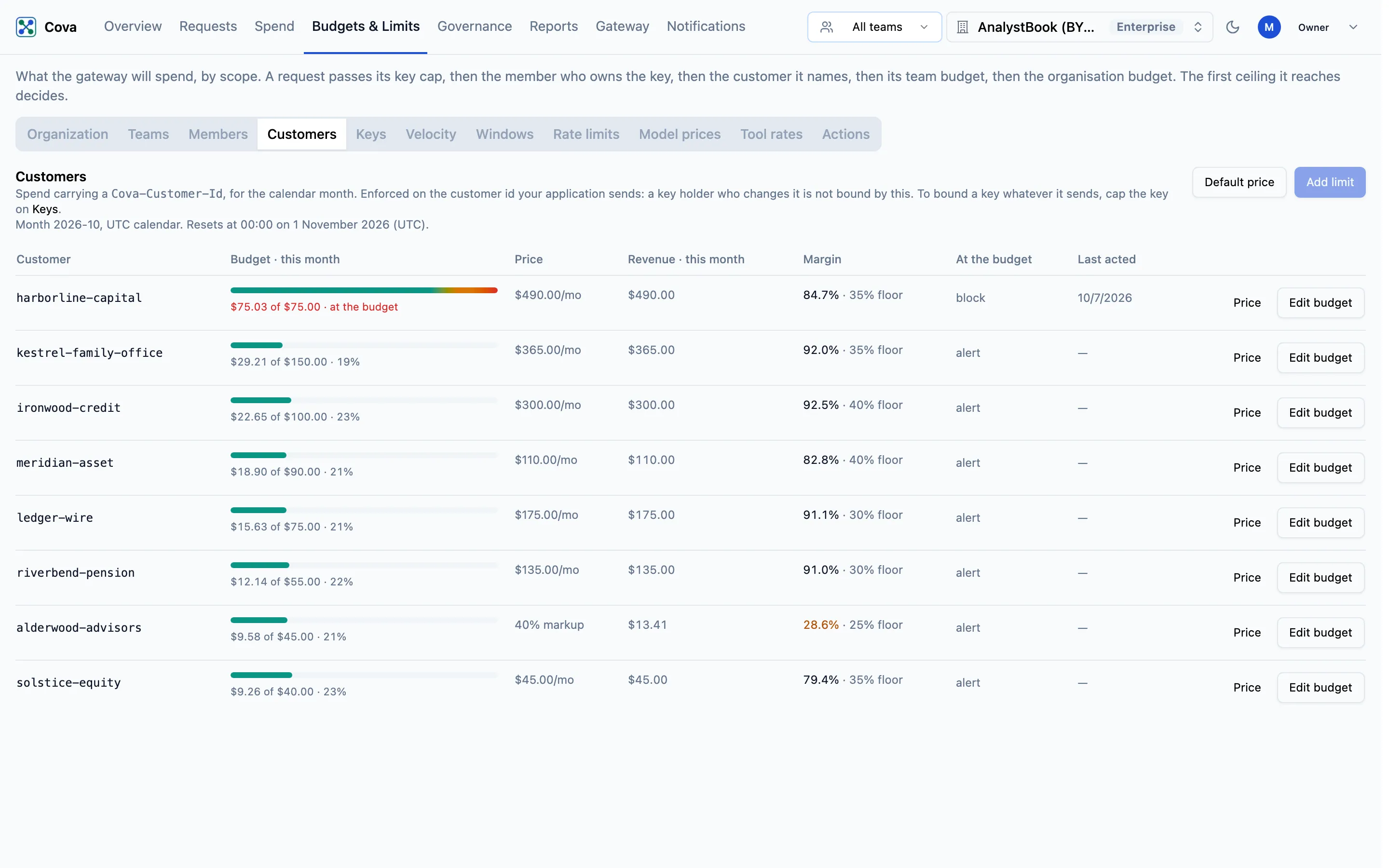
- For one customer, click Price on the customer's row.
- For every customer without a price of their own, click Default price at the top of the tab.
The table lists customers that have a budget or a price of their own. To price a customer who has neither, give them a budget first with Add limit, or cover them with the default price.
Fill in the price
| Field | What it means |
|---|---|
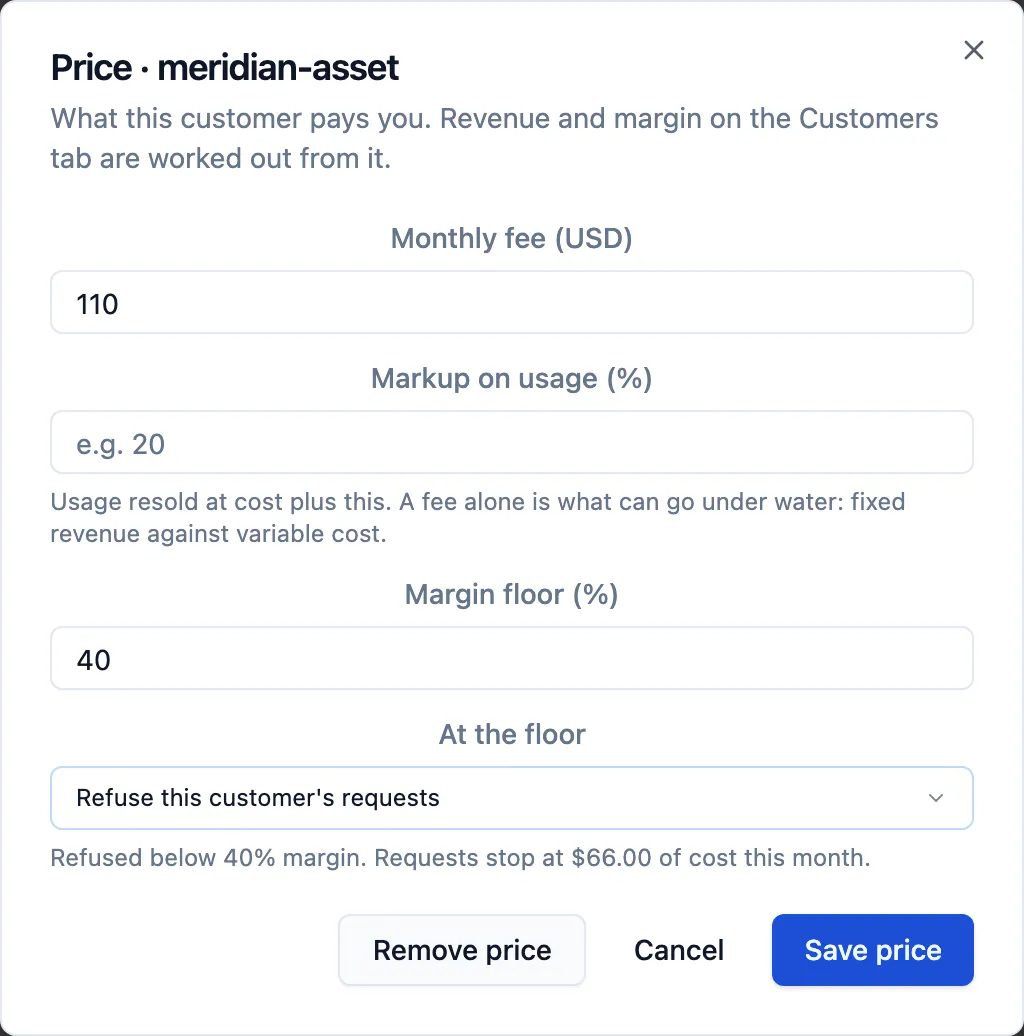
| Monthly fee (USD) | A fixed amount the customer pays each month. |
| Markup on usage (%) | What you charge on top of their AI cost. 0 means you resell usage at cost; leaving it blank means usage is not resold at all. |
| Margin floor (%) | Optional. The lowest margin you accept, from 0 up to (not including) 100. |
| At the floor | Appears once a floor is set. Alert me, keep serving, or Refuse this customer's requests. |
A price needs a fee, a markup, or both. With a markup and no fee the margin never changes, so the dialog refuses a floor above it, because every request would breach it.
Save
Click Save price. To take a price away, open the dialog and click Remove price; a customer with no price of their own then falls back to the default price, if there is one.
How revenue and margin are calculated
For a customer whose AI cost this month is c:
| Price | Revenue | Margin |
|---|---|---|
| Fee F, no markup | F | (F − c) ÷ F |
| Markup m% (with or without a fee) | F + c × (1 + m/100) | (Revenue − c) ÷ Revenue |
With a fee alone, revenue is fixed while cost grows, so the margin can go below zero. With a markup, the margin falls towards m ÷ (100 + m) as cost grows but never below it: 20% for a 25% markup.
On the Customers tab:
| Column | What it shows |
|---|---|
| Price | The fee per month and the markup. (default) means the customer is on the default price. |
| Revenue · this month | Revenue for this calendar month so far. |
| Margin | This month's margin, with the floor beside it. Amber within 10 points above the floor, red below it. |
The same revenue and margin appear in Chargeback, Unit economics and Value, shared across a customer's rows in proportion to cost.
What a margin floor does
Alert me, keep serving. CoreValue checks customer margins every 15 minutes. It sends a warning when a customer's margin is within 10 points above the floor, and an alert when it falls below the floor. Each is sent at most once per customer per month; a customer already below the floor at the first check gets only the alert. Alerts go by email to your budget alert recipients and to Slack channels set up for budget alerts. They are not sent to webhooks.
Refuse this customer's requests. The floor becomes a ceiling on what the customer may cost you this month: the cost at which their margin would reach the floor. The dialog shows it as Requests stop at an amount of cost this month. Once the customer's cost reaches it, the gateway refuses further requests that carry their Cova-Customer-Id, as it would for a customer budget set to refuse, until the month ends. If the customer also has a refusing budget at the same or a lower amount, that budget applies instead. The same margin alerts are sent as well.
A floor the markup alone keeps the margin above (a floor at or below m ÷ (100 + m)) has no ceiling and refuses nothing.
Like customer budgets, this is enforced on the customer ID your application sends. To bound a key whatever it sends, cap the key.