Value
Weigh what AI costs against what the work is worth, using a value per unit you declare.
Value compares what requests cost with what the work they did is worth. Your application records a measure of the work on each request, such as minutes saved, and you declare what one unit of it is worth in dollars. Both sides are then money, so the ratio reads plainly: 1.0x means break-even.
CoreValue does the arithmetic from your inputs. It cannot tell you what an hour saved is worth to your business; agree the rate with the people who own the workflow.
Before you start
| Requirement | Detail |
|---|---|
| Where | Top bar → Reports → Value (/reports?tab=value). |
| Role | Viewing needs reports.read. Declaring or changing a rate needs spend_controls.write. Owners and admins have both. See Roles and permissions. |
| Plan | Declaring a rate needs the Growth or Enterprise plan. A rate set earlier keeps working on any plan. |
1. Record the measure on each request
Send the measure as a custom property on each request, as a plain number:
-H "Cova-Property-Time-Saved-Mins: 12"The gateway lowercases property names and turns hyphens into underscores, so this header is recorded as time_saved_mins. Use that recorded name when you declare the rate.
A value that is not a number, such as high or 2 hours, is not counted as zero. The request is left out of the ratio, its cost with it, and the page tells you how many requests were skipped.
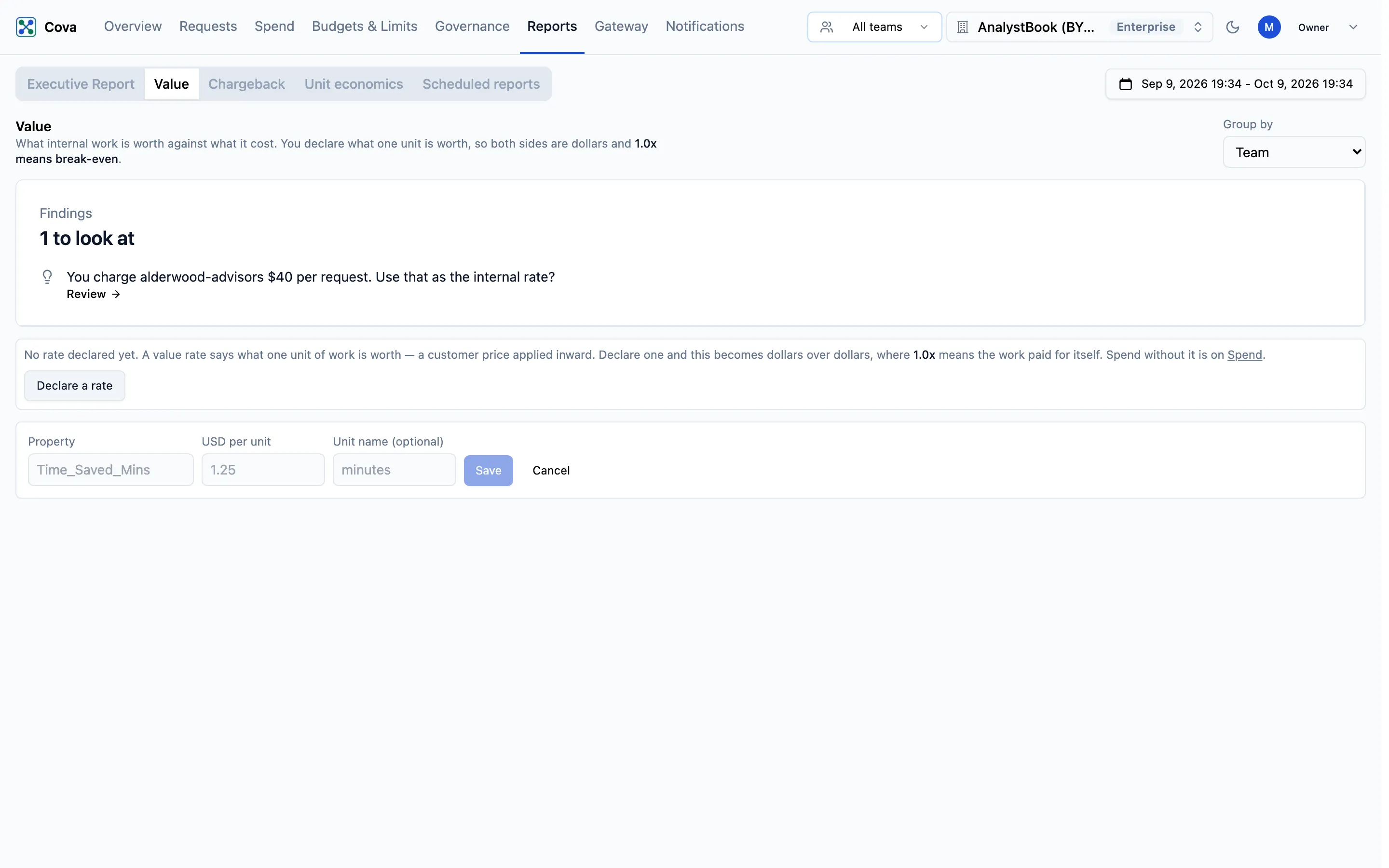
2. Declare a rate
-
Click Declare a rate (or Change rate once one exists).
-
Fill in the form:
Field What it means Property The recorded property name, for example time_saved_mins.USD per unit What one unit is worth. Must be greater than zero. Unit name (optional) How the unit reads on the page, for example minutes. -
Click Save. You will see "Rate saved".
With more than one rate declared, a Value property menu appears so you can choose which one the page uses.
Read the report
Choose Group by: Team, Customer or Feature. Team is the key's team, Customer is the Cova-Customer-Id your application sends, and Feature is Cova-Feature-Id. The page shows the latest month, with a six-month trend per row.
Custom property also appears in the menu, but grouping by a property does not yet show results in the console.
Summary
Cost, then Budget and Variance when an organisation budget is set, then Value (the units counted, at your rate) and ROI. ROI is uncoloured when it rests on less than half of the spend.
Table
| Column | What it means |
|---|---|
| Cost | Everything the group spent in the month, whether or not its requests carried the property. |
| Budget, Variance | The group's budget and how far cost is over or under it. Shown for Team and Customer only. |
| Measured | The cost of requests that carried a number for the property. |
| Coverage | Measured as a share of Cost. |
| Value | Units counted × USD per unit. |
| ROI | Value ÷ Measured. Green at 1.0x or above, red below. Marked * and left uncoloured when coverage is under half. |
| 6 months | ROI per month. |
| Revenue | What the group's customers pay you, from customer pricing. Shown beside value, never added to it. |
A dash means there was nothing to compare, not that the work was worthless. Spend with no team or no customer is listed as — unattributed.
Provisional and closed months
A month that Chargeback has not closed is marked Provisional — read live, and can still change. Once it closes, the Team and Customer cost is the closed figure. Value and ROI are always read live, because a closed month never stored them. Feature is never closed, so its months are always read live.
Value does not say what anyone owes. Chargeback is the month of record.
Related
- Unit economics: what one request, run or end user costs
- Cost attribution: tagging requests with customers, users and properties