Budget alerts
Get an email before the organisation budget runs out, and whenever a budget is reached.
Budget alerts tell people about spend before and when it hits a budget. They do not replace a budget's action: an Alert only budget still serves requests, and a Block requests budget still refuses them. Alerts give the budget's owner time to respond.
Before you start
| Requirement | Detail |
|---|---|
| Where | Top bar → Notifications → Budget alerts (/notifications?tab=budget-alerts). |
| Role | Changing recipients or thresholds needs spend_controls.write, which owners and admins hold. See Roles and permissions. |
| Plan | Every plan. |
What sends an alert
| Alert | When it is sent | How often |
|---|---|---|
| Early warning | The organisation budget's spend crosses a percentage you set under Warn before the budget is reached. | Once per mark per month. If you raise the budget mid-month, a mark can be crossed, and announced, again. |
| Budget reached | An organisation or team budget is reached, whatever its action, or a member or customer budget refuses a request. | At most once an hour for each budget. |
| Margin | A customer's margin nears or falls below its floor. See Customer pricing. | Once per customer per month for each. |
| Velocity | A velocity limit trips. | See that page. |
Only the highest mark crossed is announced. If spend jumps from 75% to 96% between two requests and your marks are 80% and 95%, you hear about 95% only.
Budgets are monthly and reset on the 1st (UTC); see Budgets & Limits.
Set recipients and warnings
Recipients
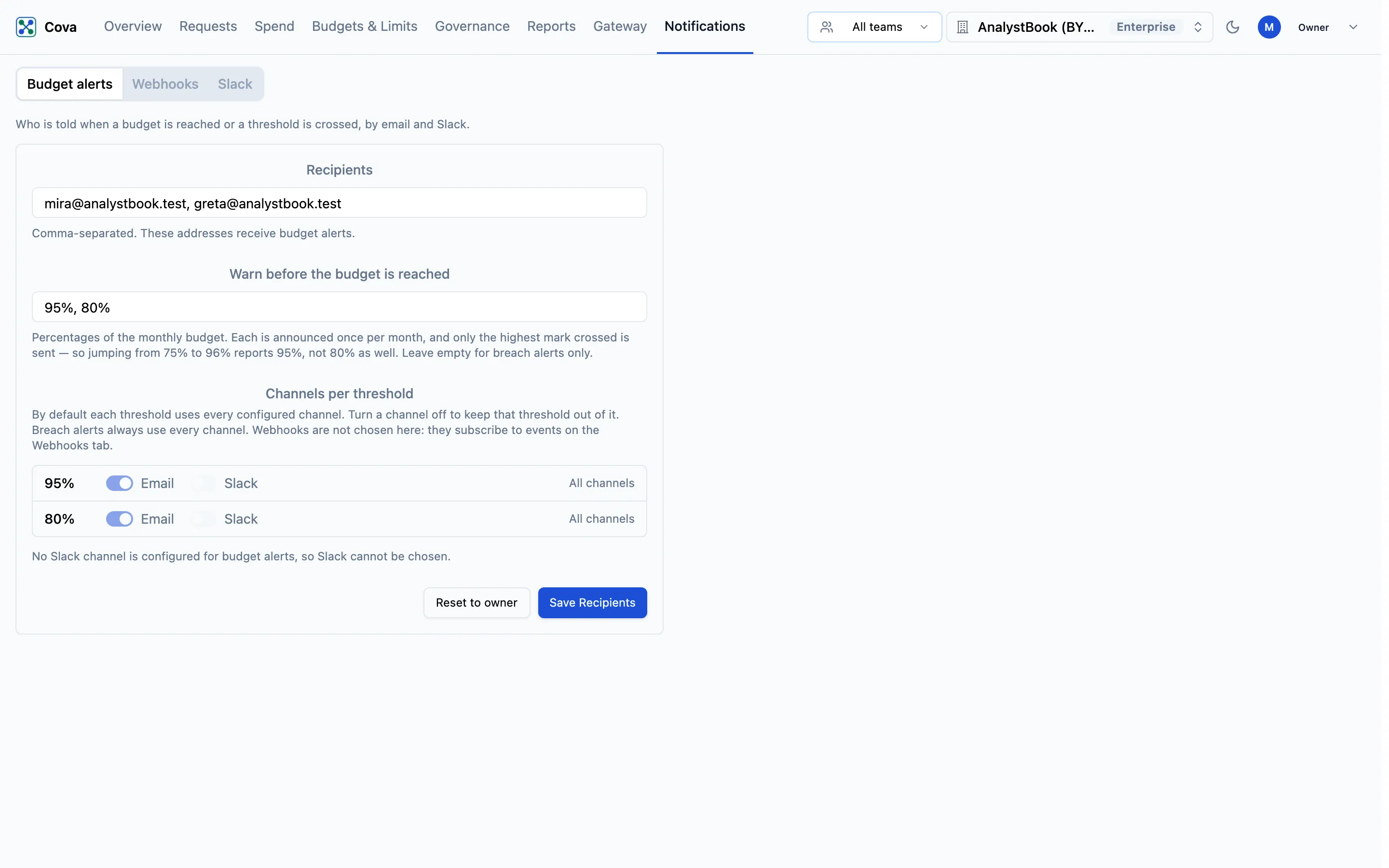
Enter email addresses, separated by commas. Until you save a list, alerts go to the organisation owner, and the hint under the field says so.
Warn before the budget is reached
Enter percentages of the organisation's monthly budget, for example 80%, 95%. 80 and 0.8 both mean 80%. Leave it empty to be told only when a budget is reached.
Channels per threshold
Each percentage gets a row with Email and Slack switches. By default every threshold uses every configured channel (All channels). Turn a channel off to keep that threshold out of it, for example 80% by email only and 95% by email and Slack. Use all channels puts a row back to the default. A threshold keeps at least one channel.
Budget reached, margin and velocity alerts always use every channel.
Save
Click Save Recipients. You will see "Budget alert recipients saved".
To go back to sending alerts to the owner, click Reset to owner.
Where alerts go
- Email: to the recipients above, or the owner if none are saved.
- Slack: to the Slack channels set up for budget alerts, through your Slack connection.
The console does not yet let you choose Slack channels for budget alerts. Until channels are set up for your organisation, the Slack switches stay off with the note "No Slack channel is configured for budget alerts, so Slack cannot be chosen.", and alerts go by email only.
Webhooks do not carry budget or margin alerts today.
Troubleshooting
Related
Daily and yearly ceilings
Cap what the organisation, a team or a key can spend in one day or one year, on a calendar in your own time zone and fiscal year.
Velocity limits
Cap how fast a proxy key, or an agent across all of its keys, can spend inside a rolling window, to stop a runaway loop in minutes instead of at the end of the month.