Your own model prices (Preview)
Record the rates you negotiated with a provider, so requests on your own provider keys can be priced at them.
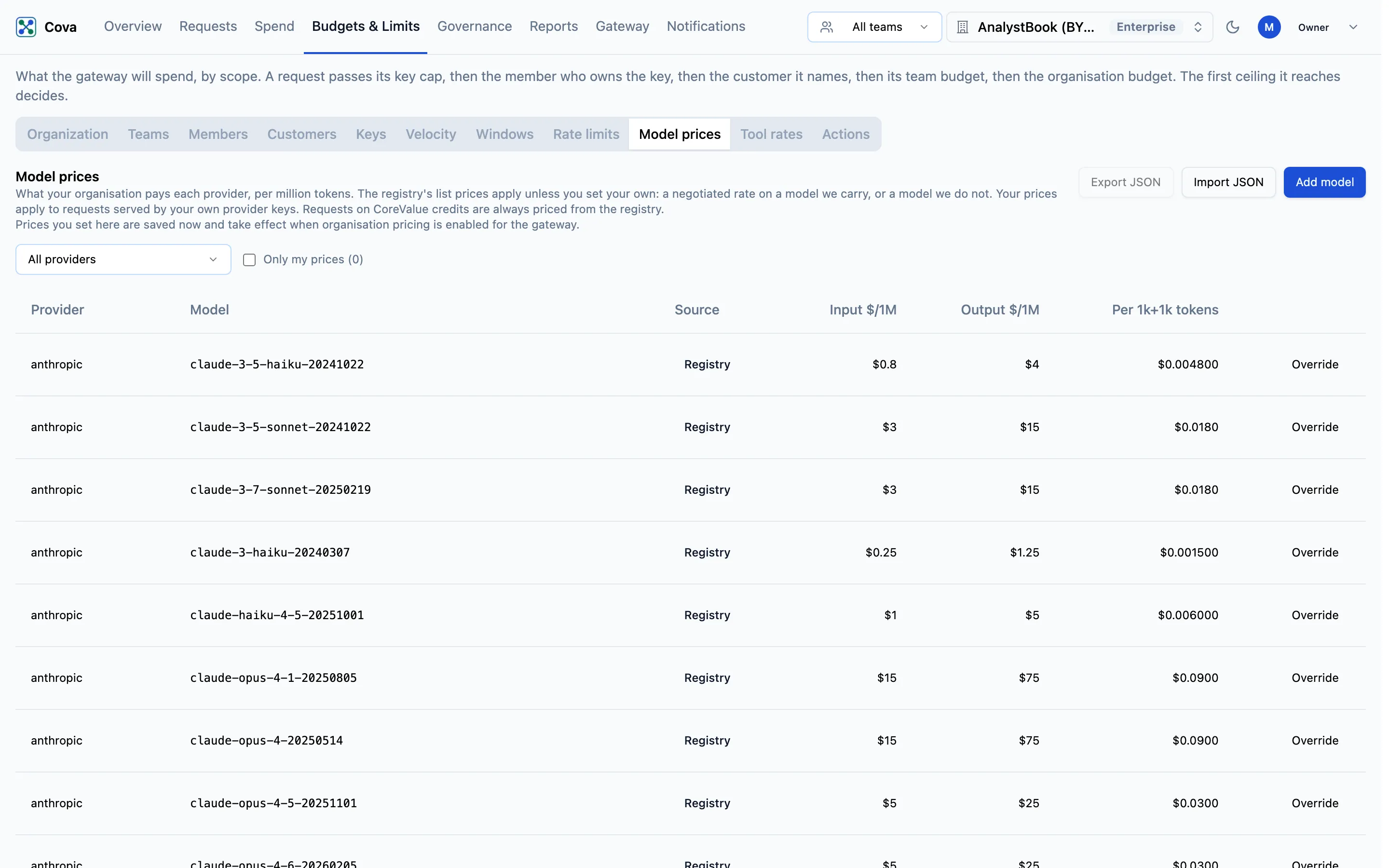
Preview: saved, not yet applied. You can set and save your own model prices today, but the gateway does not use them yet. Every request is still priced from CoreValue's price registry. The tab says so: Prices you set here are saved now and take effect when organisation pricing is enabled for the gateway.
CoreValue prices each request from its registry of provider list prices. If your contract with a provider has different rates, or you use a model the registry does not carry, you can record your own rates on the Model prices tab. Once organisation pricing is switched on, requests served by your own provider keys will be priced at them.
Before you start
| Requirement | Detail |
|---|---|
| Where | Top bar → Budgets & Limits → Model prices (/budgets?tab=model-prices). |
| Role | Adding, changing, importing or removing prices needs spend_controls.write, which owners and admins hold. See Roles and permissions. |
| Plan | Growth or Enterprise. On another plan Add model and Import JSON are disabled; prices set earlier are kept and can be removed. |
What the prices will apply to
- Only requests on your own provider keys. Requests paid with CoreValue credits are always priced from the registry.
- Only the exact provider and model. A price applies to requests for that provider and that provider's model ID.
Read the table
The table lists the registry's models with your prices layered on top. Use the provider menu (All providers or one provider) and Only my prices to narrow it.
| Column | What it means |
|---|---|
| Provider | The provider the price is for. |
| Model | The model ID as the provider names it. |
| Source | Registry (CoreValue's list price), Your price (you override a registry model) or Added by you (a model the registry does not carry). registry changed means the registry's rate has moved since you set your price. |
| Input $/1M, Output $/1M | Rates per million input and output tokens. |
| Per 1k+1k tokens | What a request of 1,000 input and 1,000 output tokens would cost at these rates. |
Set a price
-
Click Override on a registry row, Edit on one of yours, or Add model for a model that is not listed.
-
Fill in the dialog:
Field What it means Provider Chosen from the list. Fixed when you edit an existing row. Model id The model ID as the provider names it. Fixed when you edit an existing row. Input ($ / 1M tokens), Output ($ / 1M tokens) Your rates. For a registry model the registry's rate is shown under each field. Cache read ($ / 1M, optional), Cache write ($ / 1M, optional) Rates for cached input, where the provider charges them. Blank means the same as input. -
Check the preview line, which compares a 1,000 + 1,000 token request at your rates with the registry's.
-
Click Save price.
To go back to the registry rate, or delete a model you added, open it and click Remove price.
Take rates from your signed provider agreement or invoice, and have a second person check them before saving. A wrong rate is applied silently to every matching request once organisation pricing is on.
Export and import
- Export JSON downloads your own prices as
model-prices.json. Do this before a large change, so you can restore the previous set. - Import JSON uploads a JSON array of prices in the same shape, with
provider,provider_model_id,input_usd_per_million,output_usd_per_million, and optionallycache_read_usd_per_millionandcache_write_usd_per_million. Every row is checked first; if any row is invalid, nothing in the file is saved.