Tool-call logging and cost
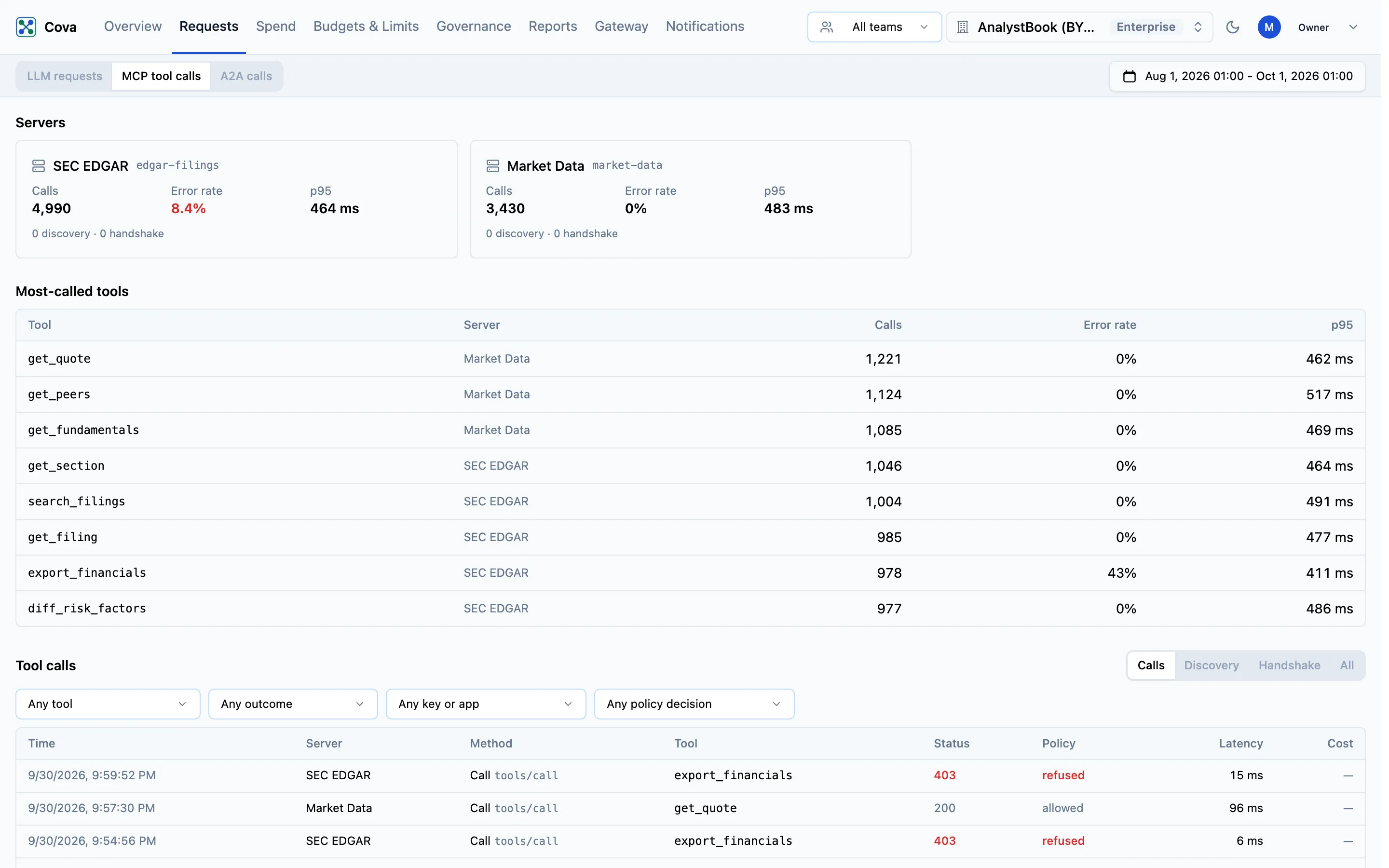
See every MCP tool call your agents make through CoreValue: which server and tool, which key, what policy decided, and how it went.
Every request an authenticated MCP client sends through CoreValue's MCP gateway is recorded as a row, whether the server answered it, it failed, or an access rule refused it. Requests → MCP tool calls is where you read them.
Before you start
| Requirement | Detail |
|---|---|
| Plan | The MCP gateway is included on the Growth and Enterprise plans. |
| Where | Top bar → Requests, then MCP tool calls at the top of the page (/requests/mcp). |
| Who sees what | The same request visibility as LLM requests. |
What is recorded for each call
| Recorded | Detail |
|---|---|
| Server and tool | The server ID and name, the JSON-RPC method (tools/call, tools/list, initialize, …) and, for a tool call, the tool's own name. |
| Who | The CoreValue API key or virtual key that made it, and that key's team. A call from a client that signed in with OAuth is marked with the client and member, for example via Claude · ana@example.com. |
| Your attribution | Cova-User-Id, Cova-Customer-Id and Cova-Property-* headers on the MCP request. They are recorded, never forwarded to the server. |
| Outcome | The HTTP status the server answered with, or no response when the call ended without one. The latency, and the size of the request and response. |
| Policy | What an access rule or the PII policy did to the call, and which rule. |
| Cost | Not priced — see Cost below. |
Read the page
The page covers the time range chosen in its header, in three parts.
Servers. One card per server that had traffic: Calls, Error rate (shown in red at 5% or more) and p95 latency, with the number of discovery and handshake requests underneath. Click a card to narrow the table to that server; click it again to clear it.
Most-called tools. The ten tools with the most calls, with their server, calls, error rate and p95.
Tool calls. The rows themselves, newest first, 50 to a page. The tabs choose the kind of request:
| Tab | Shows |
|---|---|
| Calls (default) | Tool calls |
| Discovery | tools/list, resources/list and prompts/list |
| Handshake | initialize, notifications/initialized, ping and server/discover |
| All | Everything |
Narrow it further with the four filters, which offer only values seen in the range:
| Filter | Choices |
|---|---|
| Tool | Any tool name; narrowed to one server's tools when a server card is selected |
| Outcome | OK, Error (4xx/5xx), No response |
| API key | One API key. Virtual keys and OAuth sign-ins cannot be picked here, but are included under Any key or app. |
| Policy | Allowed by a rule, Would be refused (audit), Refused |
The Policy column reads allowed, would deny or refused for an access rule, and PII redacted, PII flagged or PII refused for the PII policy; hover it for the rule. A refused call stays on the page, so you can see what a rule blocked. The Access rules list links here with the matching policy filter already set.
How the numbers are counted
- Errors and latency count tool calls only. Discovery and handshake requests are listed but never counted, so a client's connection probe that a server answers with
400does not inflate the error rate. - A tool failure inside HTTP 200 is not visible yet. MCP servers often report a failed tool as a successful HTTP response with an error in its body; such a call shows as OK.
- Latency starts after CoreValue authenticates the caller, so the first call in a session can feel slower than its row says.
Cost
MCP tool calls are not priced. The Cost column shows —, never $0, and tool calls are left out of every dollar total, budget and report in the console. A dash means not known, not free.
On Budgets & Limits → Tool rates, owners and admins can already declare what one call to a tool costs your organisation — a flat rate per call in US dollars, with the Source of the number — for a single tool or every tool on a server. These rates are your own figures, never a charge from CoreValue.
Tool rates are stored but not applied yet. As the tab says: no call is priced from them and no total, budget or report changes. Rows on this page keep showing — until they are.