Custom Properties
When building AI applications, you often need to track and analyze requests by different dimensions like project, feature, or workflow stage. Custom Properties let you tag LLM requests with metadata, enabling advanced filtering, cost analysis per user or feature, and performance tracking across different parts of your application.
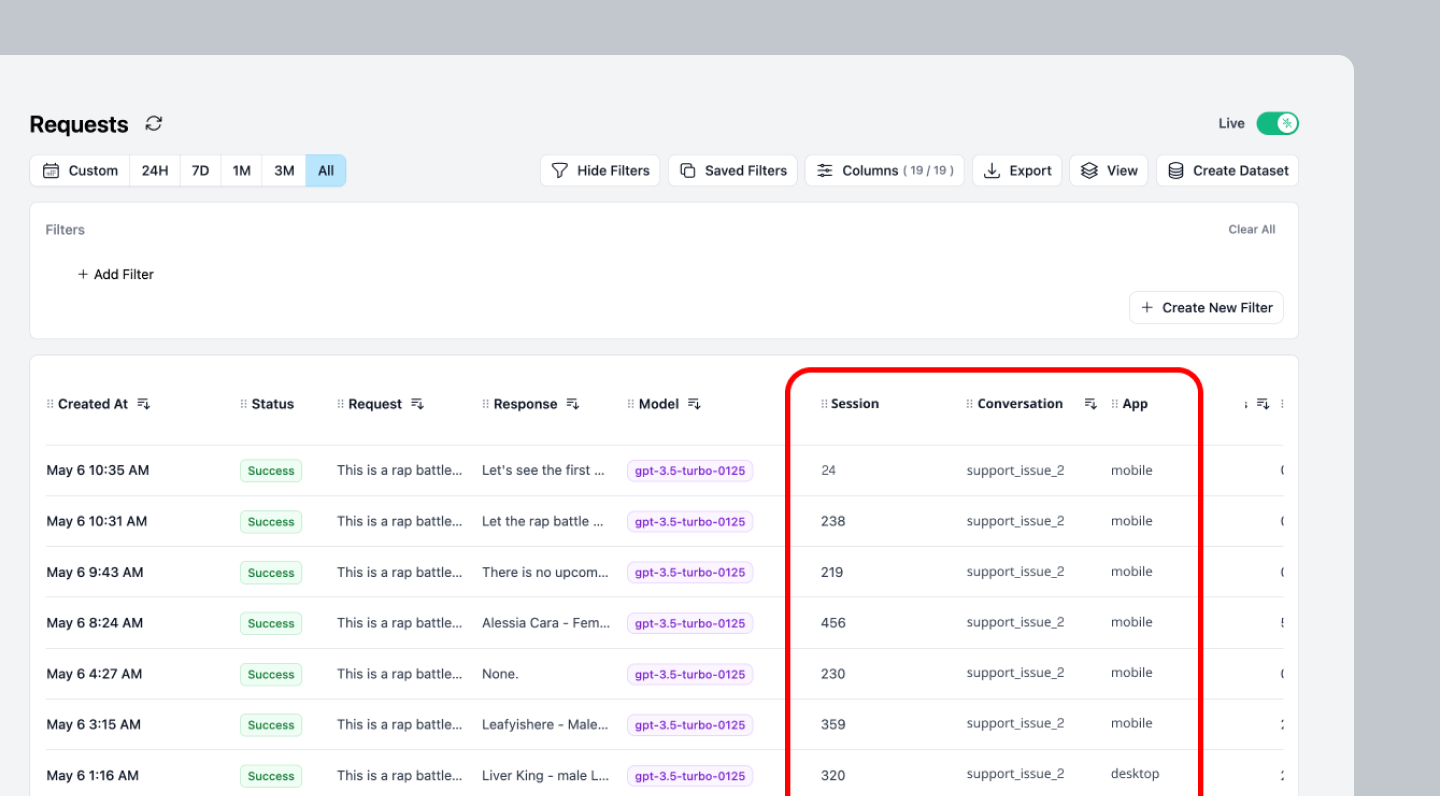
Why use Custom Properties
- Track unit economics: Calculate cost per user, conversation, or feature to understand your application's profitability
- Debug complex workflows: Group related requests in multi-step AI processes for easier troubleshooting
- Analyze performance by segment: Compare latency and costs across different user types, features, or environments
Quick Start
Use headers to add Custom Properties to your LLM requests.
Name your header in the format Cova-Property-[Name] where Name is the name of your custom property.
The value is a string that labels your request for this custom property. Here are some examples:
import { OpenAI } from "openai";

const client = new OpenAI({
  baseURL: "https://gateway.corevalue.dev/v1",
  apiKey: process.env.COVA_API_KEY,
  defaultHeaders: {
    "Cova-Property-Conversation": "support_issue_2",
    "Cova-Property-App": "mobile",
    "Cova-Property-Environment": "production",
  },
});

const response = await client.chat.completions.create({
  model: "gpt-4o-mini",
  messages: [{ role: "user", content: "Hello, how are you?" }]
});
from openai import OpenAI
client = OpenAI(
base_url="https://gateway.corevalue.dev/v1",
api_key=os.getenv("COVA_API_KEY"),
default_headers={
"Cova-Property-Conversation": "support_issue_2",
"Cova-Property-App": "mobile",
"Cova-Property-Environment": "production",
}
)
response = client.chat.completions.create(
model="gpt-4o-mini",
messages=[{"role": "user", "content": "Hello, how are you?"}]
)curl https://gateway.corevalue.dev/v1/chat/completions \
-H "Content-Type: application/json" \
-H "Authorization: Bearer $COVA_API_KEY" \
-H "Cova-Property-Conversation: support_issue_2" \
-H "Cova-Property-App: mobile" \
-H "Cova-Property-Environment: production" \
-d '{
"model": "gpt-4o-mini",
"messages": [
{
"role": "user",
"content": "Hello, how are you?"
}
]
}'from langchain_openai import ChatOpenAI
llm = ChatOpenAI(
openai_api_key="<COVA_API_KEY>",
openai_api_base="https://gateway.corevalue.dev/v1",
model_name="gpt-4o-mini",
default_headers={
"Cova-Property-Type": "Course Outline"
}
)
course = llm.predict("Generate a course outline about AI.")
# Update corevalue properties/headers for each request
llm.model_kwargs["headers"] = {
"Cova-Property-Type": "Lesson"
}
lesson = llm.predict("Generate a lesson for the AI course.")Understanding Custom Properties
How Properties Work
Custom properties are metadata attached to each request that help you:
What they enable:
- Filter requests in the dashboard by any property
- Calculate costs and metrics grouped by properties
- Export data segmented by custom dimensions
- Set up alerts based on property values
Use Cases
Track performance and costs across different environments and deployments:
import { OpenAI } from "openai";

const client = new OpenAI({
  baseURL: "https://gateway.corevalue.dev/v1",
  apiKey: process.env.COVA_API_KEY,
});

// Production deployment
const response = await client.chat.completions.create(
  {
    model: "gpt-4o-mini",
    messages: [{ role: "user", content: "Process this customer request" }]
  },
  {
    headers: {
      "Cova-Property-Environment": "production",
      "Cova-Property-Version": "v2.1.0",
      "Cova-Property-Region": "us-east-1"
    }
  }
);

// Staging deployment with different version
const testResponse = await client.chat.completions.create(
  {
    model: "gpt-4o-mini",
    messages: [{ role: "user", content: "Test new feature" }]
  },
  {
    headers: {
      "Cova-Property-Environment": "staging",
      "Cova-Property-Version": "v2.2.0-beta",
      "Cova-Property-Region": "us-west-2"
    }
  }
);

// Compare performance and costs across environments
from openai import OpenAI
import os
client = OpenAI(
base_url="https://gateway.corevalue.dev/v1",
api_key=os.environ.get("COVA_API_KEY"),
)
# Production request
response = client.chat.completions.create(
model="gpt-4o-mini",
messages=[{"role": "user", "content": "Process this customer request"}],
extra_headers={
"Cova-Property-Environment": "production",
"Cova-Property-Version": "v2.1.0",
"Cova-Property-Region": "us-east-1"
}
)
# Development request
dev_response = client.chat.completions.create(
model="gpt-4o-mini",
messages=[{"role": "user", "content": "Test prompt changes"}],
extra_headers={
"Cova-Property-Environment": "development",
"Cova-Property-Version": "v2.2.0-dev",
"Cova-Property-Region": "local"
}
)Track support interactions by ticket ID and case details for debugging and cost analysis:
// Initial customer inquiry
const response = await client.chat.completions.create(
  {
    model: "gpt-4o-mini",
    messages: [
      { role: "system", content: "You are a helpful customer support agent." },
      { role: "user", content: "My order hasn't arrived yet, what should I do?" }
    ]
  },
  {
    headers: {
      "Cova-Property-TicketId": "TICKET-12345",
      "Cova-Property-Category": "shipping",
      "Cova-Property-Priority": "medium",
      "Cova-Property-Channel": "chat"
    }
  }
);

// Follow-up question in same ticket
const followUp = await client.chat.completions.create(
  {
    model: "gpt-4o-mini",
    messages: [
      { role: "system", content: "You are a helpful customer support agent." },
      { role: "user", content: "Can you help me track the package?" }
    ]
  },
  {
    headers: {
      "Cova-Property-TicketId": "TICKET-12345",
      "Cova-Property-Category": "shipping",
      "Cova-Property-Priority": "high",  // Escalated priority
      "Cova-Property-Channel": "chat"
    }
  }
);

// Track costs per ticket, debug issues by category, analyze resolution patterns
Configuration Reference
Header Format
Custom properties use a simple header-based format:
Cova-Property-[Name]stringAny custom metadata you want to track. Replace [Name] with your property name.
Example: Cova-Property-Environment: staging
Cova-User-IdstringSpecial reserved property for user tracking. Enables per-user cost analytics and usage metrics. See User Metrics for detailed tracking capabilities.
Example: Cova-User-Id: user-123
Advanced Features
Updating Properties After Request
You can update properties after a request is made using the REST API:
// Get the request ID from the response
const { data, response } = await client.chat.completions
  .create({ /* your request */ })
  .withResponse();

const requestId = response.headers.get("cova-id");

// Update properties via API
await fetch(`https://api.corevalue.dev/v1/request/${requestId}/property`, {
  method: "PUT",
  headers: {
    "Authorization": `Bearer ${COVA_API_KEY}`,
    "Content-Type": "application/json"
  },
  body: JSON.stringify({
    "Environment": "production",
    "PostProcessed": "true"
  })
});
Querying by Custom Properties
Once you've added custom properties to your requests, you can filter and retrieve requests using those properties via the Query API.
Important: When filtering by custom properties, you MUST wrap the properties filter inside a request_response_rmt object. Omitting this wrapper will return empty results.
Simple Property Filter
Filter requests by a single property value:
curl --request POST \
  --url https://api.corevalue.dev/v1/request/query-clickhouse \
  --header "Content-Type: application/json" \
  --header "authorization: Bearer $COVA_API_KEY" \
  --data '{
  "filter": {
    "request_response_rmt": {
      "properties": {
        "Environment": {
          "equals": "production"
        }
      }
    }
  },
  "limit": 100
}'
Multiple Property Filters
Combine multiple property filters using AND/OR operators:
curl --request POST \
  --url https://api.corevalue.dev/v1/request/query-clickhouse \
  --header "Content-Type: application/json" \
  --header "authorization: Bearer $COVA_API_KEY" \
  --data '{
  "filter": {
    "left": {
      "request_response_rmt": {
        "properties": {
          "Environment": {
            "equals": "production"
          }
        }
      }
    },
    "operator": "and",
    "right": {
      "request_response_rmt": {
        "properties": {
          "App": {
            "equals": "mobile"
          }
        }
      }
    }
  },
  "limit": 100
}'
Combining Properties with Other Filters
Filter by properties AND other criteria like date range or model:
curl --request POST \
  --url https://api.corevalue.dev/v1/request/query-clickhouse \
  --header "Content-Type: application/json" \
  --header "authorization: Bearer $COVA_API_KEY" \
  --data '{
  "filter": {
    "left": {
      "request_response_rmt": {
        "request_created_at": {
          "gte": "2024-01-01T00:00:00Z"
        }
      }
    },
    "operator": "and",
    "right": {
      "request_response_rmt": {
        "properties": {
          "Conversation": {
            "equals": "support_issue_2"
          }
        }
      }
    }
  },
  "limit": 100
}'
Common Mistake
See the full Query API documentation for more advanced filtering options.
Related Features
User Metrics
Track per-user costs and usage with the special Cova-User-Id property
Sessions
Group related requests with Cova-Session-Id for workflow tracking
Webhooks
Filter webhook deliveries based on custom property values
Alerts
Set up alerts triggered by specific property combinations