Omit Logs
Legacy / Unsupported. The Cova-Omit-Request and Cova-Omit-Response
request headers were supported by the legacy Cloudflare Worker proxy. They
are not read by the current AI Gateway (gateway/src/) and sending them
has no effect. The Python async logging snippets below reference the legacy
corevalue_async package (now cova_async). This page is retained for historical reference
only. See the
Header Directory
for the list of unsupported headers.
When handling sensitive data or operating under strict compliance requirements, you may need to track LLM metrics without storing the actual request and response content. Omit Logs lets you maintain observability for costs, latency, and usage patterns while excluding sensitive data from storage.
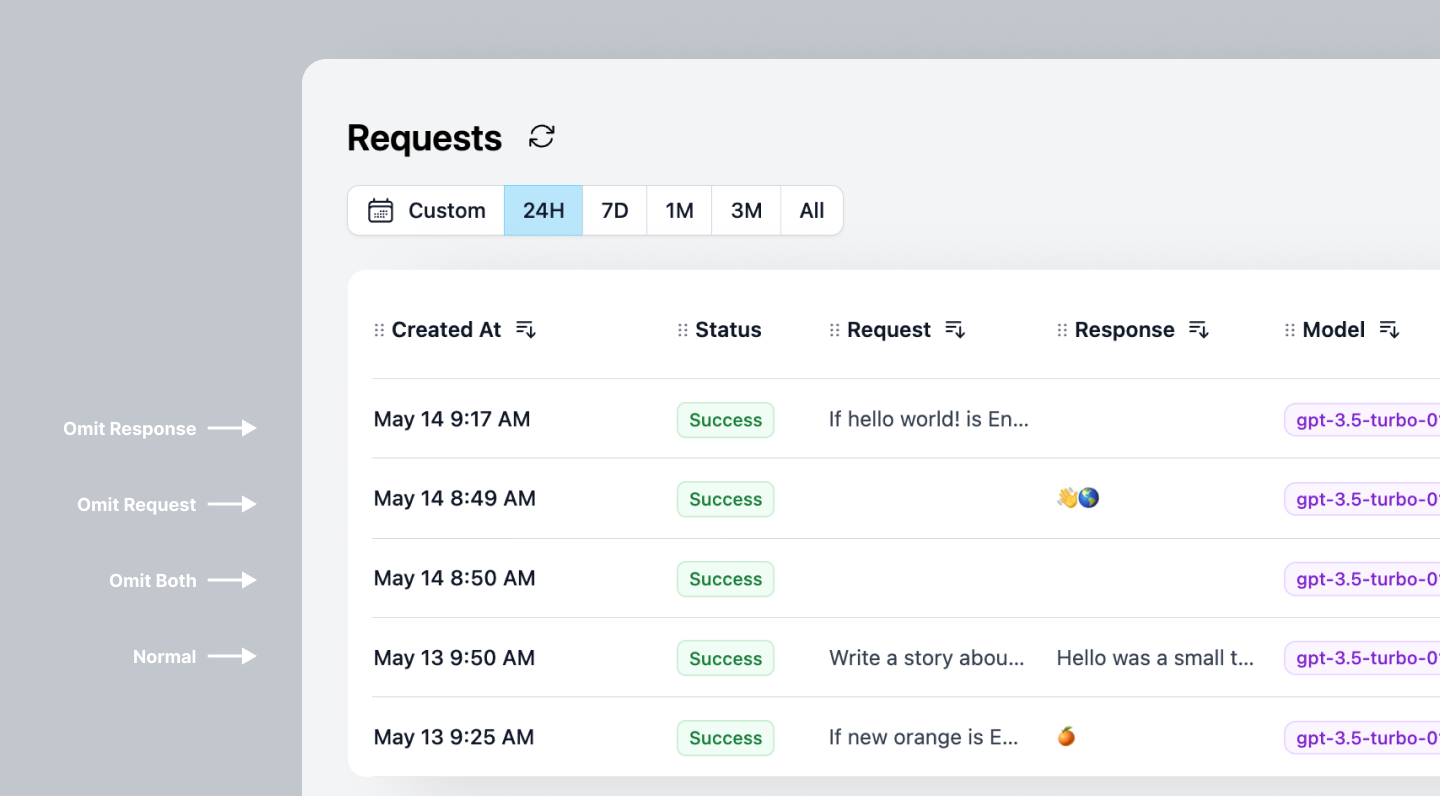
Why use Omit Logs
- Maintain compliance: Meet GDPR, HIPAA, and other regulatory requirements by excluding sensitive content from logs
- Protect sensitive data: Prevent PII, financial data, or proprietary information from being stored in observability systems
- Keep essential metrics: Still track costs, latency, token usage, and performance without storing actual content
All responses and requests are only stored in memory and never in long-term storage.
There are two ways to omit logs:
- Headers: Use this if you're not using CoreValue's Python Asynchronous Logging.
- CoreValue Python Async Logging: Use this if you're using CoreValue's Python Asynchronous Logging and don't want to send the request or response to our backend.
Headers
Note: This method does not store the request or response but it still sends it to our backend.
To omit logging requests, set Cova-Omit-Request to true.
To omit logging responses, set Cova-Omit-Response to true.
curl https://gateway.corevalue.dev/v1/chat/completions \
  -H "Content-Type: application/json" \
  -H "Authorization: Bearer $COVA_API_KEY" \
  -H "Cova-Omit-Request: true" \
  -H "Cova-Omit-Response: true" \
 -d '{
    "model": "gpt-4o-mini",
    "messages": [
      {
        "role": "user",
        "content": "How do I enable custom rate limit policies?"
      }
    ]
}'
client = OpenAI(
api_key=COVA_API_KEY,
base_url="https://gateway.corevalue.dev/v1",
)
client.chat.completions.create(
model="gpt-4o-mini",
messages=[{"role": "user", "content": "How do I enable retries?"}],
headers={
"Cova-Omit-Request": "true", # Add this header and set to true
"Cova-Omit-Response": "true", # Add this header and set to true
}
)import { OpenAI } from "openai";
const openai = new OpenAI({
apiKey: process.env.COVA_API_KEY,
baseURL: "https://gateway.corevalue.dev/v1",
defaultHeaders: {
"Cova-Omit-Request": "true", // Add this header and set to true
"Cova-Omit-Response": "true", // Add this header and set to true
},
});Python Async Logging
If you are using CoreValue's Asynchronous Logging, you have the option to not even send the request or response to our backend.
from cova_async import CovaAsyncLogger
from openai import OpenAI

logger = CovaAsyncLogger(
  api_key=COVA_API_KEY,
)

logger.init()

client = OpenAI(api_key=OPENAI_API_KEY)

logger.disable_content_tracing() # This will omit the request and response from being sent to our backend till the time you call logger.enable_content_tracing()

# Make the OpenAI call
response = client.chat.completions.create(
  model="gpt-4o-mini",
  messages=[{"role": "system", "content": "You are a helpful assistant."},
            {"role": "user", "content": "Who won the world series in 2020?"},
            {"role": "assistant",
             "content": "The Los Angeles Dodgers won the World Series in 2020."},
            {"role": "user", "content": "Where was it played?"}]
)

print(response.choices[0])
logger.enable_content_tracing() # All future requests will be sent with the request and response
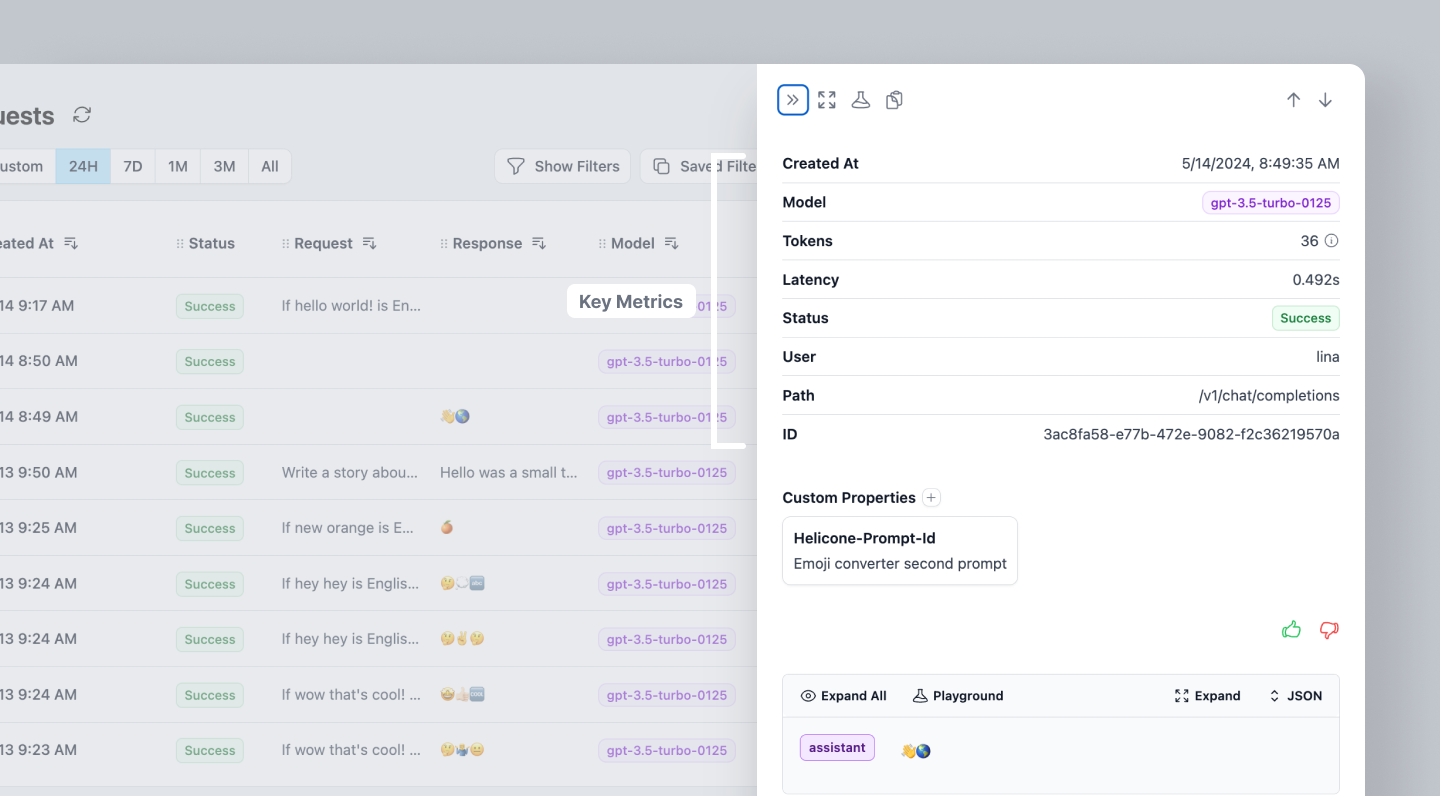
Request View
You can still see the key metrics for each request, without the request or response contents.
Completely Disabling Logging
If you are using CoreValue's Asynchronous Logging, you can also completely disable all logging to CoreValue:
from cova_async import CovaAsyncLogger
from openai import OpenAI

logger = CovaAsyncLogger(
  api_key=COVA_API_KEY,
)

logger.init()

# Completely disable all logging
logger.disable_logging()

# Your OpenAI calls here
# No data will be sent to CoreValue

# Later, re-enable logging if needed
logger.enable_logging()
When logging is disabled, no traces will be sent to CoreValue at all. This is different from disable_content_tracing() which only omits request and response content but still sends other metrics. Note that this feature is only available when using CoreValue's async integration mode and not with the proxy integration.
Request View
You can still see the key metrics for each request, without the request or response contents.
Moderations
Enable OpenAI's moderation feature in your LLM applications to automatically detect and filter harmful content in user messages.
Retries
The AI Gateway automatically retries failed LLM requests using exponential backoff. Retry behavior is configured server-side; observe attempts via the X-Cova-Retry-Count response header.