Building and Monitoring AI Agents with CoreValue
Learn how to build autonomous AI agents, monitor and optimize their performance using CoreValue's Sessions.
Feature gating: This guide uses Sessions and Custom Properties, which are
non-free features (Growth tier or higher). They may be disabled in your
deployment. Set COVA_FEATURE_SESSIONS=true and ensure Properties is enabled
for your organization. Requires: Growth tier or higher.
AI agents are transforming how we interact with software, moving beyond simple question-answer systems to tools that can actually do things for us. But as agents become more autonomous and complex, monitoring their behavior becomes critical.
This guide shows you how to build a true AI agent—one that can think, decide, and act autonomously—while using CoreValue's Sessions to track every decision, tool usage, and interaction.
What Makes a True AI Agent?
The key distinction between a true agent and an automation (also known as a "workflow") lies in autonomy and dynamic decision-making:
- Workflows are like a GPS with a fixed route—if there's a roadblock, it can't adapt
- Agents are like having a local guide who knows all the shortcuts and can change plans on the fly
What We'll Build
We'll create a stock information agent that can:
- Fetch real-time stock prices using the Yahoo Finance API
- Find company CEOs from stock data
- Identify ticker symbols from company names
- Chain tool calls to answer complex queries
What makes this a true agent is that it autonomously decides:
- Which tool to use for each query
- When to chain multiple tools together
- When to ask the user for more information
- How to handle errors and retry with different approaches
And with CoreValue's Sessions, we can monitor every decision and tool execution the agent makes to pinpoint issues and optimize performance.
Prerequisites
You'll need:
- Python 3.7 or higher
- A CoreValue API key (get one free at corevalue.dev)
- An OpenAI API key (get one free at openai.com)
Create a project directory and install packages:
mkdir stock-agent-corevalue
cd stock-agent-corevalue
pip install openai yfinance python-dotenv corevalue-helpers
Create a .env file:
COVA_API_KEY=your_corevalue_key_here
OPENAI_API_KEY=your_openai_key_here
Building the AI Agent
First, let's create our agent class and initialize an OpenAI client with CoreValue integration. We'll use the gateway baseURL to log tool usage:
import json
import uuid
from typing import Optional, Dict, Any, List
from openai import OpenAI
import yfinance as yf
from dotenv import load_dotenv
import os
from corevalue_helpers import CoreValueManualLogger

load_dotenv()

class StockInfoAgent:
    def __init__(self):
        # Initialize OpenAI client with CoreValue for LLM calls
        self.client = OpenAI(
            api_key=os.getenv('OPENAI_API_KEY'),
            base_url="https://gateway.corevalue.dev/v1",
            default_headers={
                "Authorization": f"Bearer {os.getenv('COVA_API_KEY')}"
            }
        )

        # Initialize CoreValue manual logger for tool calls
        self.corevalue_logger = CoreValueManualLogger(
            api_key=os.getenv('COVA_API_KEY'),
            headers={
                "Cova-Property-Type": "Stock-Info-Agent"
            }
        )

        self.conversation_history = []
        self.session_id = None
        self.session_headers = {}
Sessions help you track complete agent conversations and see how tools chain together:
def start_new_session(self):
    """Initialize a new session for tracking."""
    self.session_id = str(uuid.uuid4())
    self.session_headers = {
        "Cova-Session-Id": self.session_id,
        "Cova-Session-Name": "Stock Information Chat",
        "Cova-Session-Path": "/stock-chat",
    }
    print(f"Started new session: {self.session_id}")
Each tool execution is logged separately with detailed results:
def get_stock_price(self, ticker_symbol: str) -> Optional[str]:
    """Fetches the current stock price."""
    def price_operation(result_recorder):
        try:
            stock = yf.Ticker(ticker_symbol.upper())
            info = stock.info
            current_price = info.get('currentPrice') or info.get('regularMarketPrice')

            if current_price:
                result = f"{current_price:.2f} USD"
                result_recorder.append_results({
                    "ticker": ticker_symbol.upper(),
                    "price": current_price,
                    "formatted_price": result,
                    "status": "success"
                })
                return result
            else:
                result_recorder.append_results({
                    "ticker": ticker_symbol.upper(),
                    "error": "Price not found",
                    "status": "error"
                })
                return None
        except Exception as e:
            result_recorder.append_results({
                "ticker": ticker_symbol.upper(),
                "error": str(e),
                "status": "error"
            })
            return None

    # Log the tool call with CoreValue
    return self.corevalue_logger.log_request(
        provider=None,
        request={
            "_type": "tool",
            "toolName": "get_stock_price",
            "input": {"ticker_symbol": ticker_symbol},
            "metadata": {
                "source": "yfinance",
                "operation": "get_current_price"
            }
        },
        operation=price_operation,
        additional_headers={
            **self.session_headers,
            "Cova-Session-Path": f"/stock-chat/price/{ticker_symbol.lower()}"
        }
    )

def get_company_ceo(self, ticker_symbol: str) -> Optional[str]:
    """Fetches the name of the CEO."""
    def ceo_operation(result_recorder):
        try:
            stock = yf.Ticker(ticker_symbol.upper())
            info = stock.info

            ceo = None
            for field in ['companyOfficers', 'officers']:
                if field in info:
                    officers = info[field]
                    if isinstance(officers, list):
                        for officer in officers:
                            if isinstance(officer, dict):
                                title = officer.get('title', '').lower()
                                if 'ceo' in title or 'chief executive' in title:
                                    ceo = officer.get('name')
                                    break

            result_recorder.append_results({
                "ticker": ticker_symbol.upper(),
                "ceo": ceo,
                "status": "success" if ceo else "not_found"
            })
            return ceo

        except Exception as e:
            result_recorder.append_results({
                "ticker": ticker_symbol.upper(),
                "error": str(e),
                "status": "error"
            })
            return None

    return self.corevalue_logger.log_request(
        provider=None,
        request={
            "_type": "tool",
            "toolName": "get_company_ceo",
            "input": {"ticker_symbol": ticker_symbol},
            "metadata": {
                "source": "yfinance",
                "operation": "get_company_officers"
            }
        },
        operation=ceo_operation,
        additional_headers={
            **self.session_headers,
            "Cova-Session-Path": f"/stock-chat/ceo/{ticker_symbol.lower()}"
        }
    )

def find_ticker_symbol(self, company_name: str) -> Optional[str]:
    """Tries to identify the stock ticker symbol"""
    def ticker_search_operation(result_recorder):
        try:
            lookup = yf.Lookup(company_name)
            stock_results = lookup.get_stock(count=5)

            if not stock_results.empty:
                ticker = stock_results.index[0]
                result_recorder.append_results({
                    "company_name": company_name,
                    "ticker": ticker,
                    "search_type": "stock",
                    "results_count": len(stock_results),
                    "status": "success"
                })
                return ticker

            all_results = lookup.get_all(count=5)
            if not all_results.empty:
                ticker = all_results.index[0]
                result_recorder.append_results({
                    "company_name": company_name,
                    "ticker": ticker,
                    "search_type": "all_instruments",
                    "results_count": len(all_results),
                    "status": "success"
                })
                return ticker

            result_recorder.append_results({
                "company_name": company_name,
                "error": "No ticker found",
                "status": "not_found"
            })
            return None

        except Exception as e:
            result_recorder.append_results({
                "company_name": company_name,
                "error": str(e),
                "status": "error"
            })
            return None

    return self.corevalue_logger.log_request(
        provider=None,
        request={
            "_type": "tool",
            "toolName": "find_ticker_symbol",
            "input": {"company_name": company_name},
            "metadata": {
                "source": "yfinance_lookup",
                "operation": "ticker_search"
            }
        },
        operation=ticker_search_operation,
        additional_headers={
            **self.session_headers,
            "Cova-Session-Path": f"/stock-chat/search/{company_name.lower().replace(' ', '-')}"
        }
    )
Implement the main processing loop, which calls tools as needed until it has a complete answer:
def process_user_query(self, user_query: str) -> str:
    """Processes a user query with comprehensive CoreValue logging."""
    self.conversation_history.append({"role": "user", "content": user_query})

    system_prompt = """You are a helpful stock information assistant. You have access to tools that can:
1. Get current stock prices
2. Find company CEOs
3. Find ticker symbols for company names

Use these tools to help answer user questions about stocks and companies.
If information is ambiguous, ask for clarification."""

    while True:
        messages = [
            {"role": "system", "content": system_prompt},
            *self.conversation_history
        ]

        def openai_operation(result_recorder):
            response = self.client.chat.completions.create(
                model="gpt-4o-mini-2024-07-18",
                messages=messages,
                tools=self.create_tool_definitions(),
                tool_choice="auto"
            )

            result_recorder.append_results({
                "model": "gpt-4o-mini-2024-07-18",
                "response": response.choices[0].message.model_dump(),
                "usage": response.usage.model_dump() if response.usage else None
            })

            return response

        # Log the OpenAI call
        response = self.corevalue_logger.log_request(
            provider="openai",
            request={
                "model": "gpt-4o-mini-2024-07-18",
                "messages": messages,
                "tools": self.create_tool_definitions(),
                "tool_choice": "auto"
            },
            operation=openai_operation,
            additional_headers={
                **self.session_headers,
                "Cova-Prompt-Id": "stock-agent-reasoning"
            }
        )

        response_message = response.choices[0].message

        # If no tool calls, we're done
        if not response_message.tool_calls:
            self.conversation_history.append({
                "role": "assistant",
                "content": response_message.content
            })
            return response_message.content

        # Execute the tool (logged separately by each tool method)
        tool_call = response_message.tool_calls[0]
        function_name = tool_call.function.name
        function_args = json.loads(tool_call.function.arguments)

        print(f"\nExecuting tool: {function_name} with args: {function_args}")
        result = self.execute_tool(function_name, function_args)

        # Add to conversation history
        self.conversation_history.append({
            "role": "assistant",
            "content": None,
            "tool_calls": [{
                "id": tool_call.id,
                "type": "function",
                "function": {
                    "name": function_name,
                    "arguments": json.dumps(function_args)
                }
            }]
        })

        self.conversation_history.append({
            "tool_call_id": tool_call.id,
            "role": "tool",
            "name": function_name,
            "content": str(result) if result is not None else "No result found"
        })
Finally, create the interactive chat loop, which serves as the entry point for the agent and kicks off the session:
def chat(self):
    """Interactive chat loop with session tracking."""
    print("Stock Information Agent with CoreValue Monitoring")
    print("Ask me about stock prices, company CEOs, or any stock-related questions!")
    print("Type 'quit' to exit.\n")

    # Start a new session
    self.start_new_session()

    while True:
        user_input = input("You: ")

        if user_input.lower() in ['quit', 'exit', 'bye']:
            print("Goodbye!")
            break

        try:
            response = self.process_user_query(user_input)
            print(f"\nAgent: {response}\n")
        except Exception as e:
            print(f"\nError: {e}\n")

if __name__ == "__main__":
    agent = StockInfoAgent()
    agent.chat()
Running the agent is simple, navigate to the project directory and run the following command:
python stock_agent.pyReal-World Example
Here's how the monitored agent handles a complex query:
You: Who is the CEO of the EV company from China and what is its stock price?

Agent: Could you please specify which Chinese electric vehicle (EV) company you are referring to? There are several prominent ones, such as NIO, Xpeng, and Li Auto, among others.

You: NIO

Executing tool: find_ticker_symbol with args: {'company_name': 'NIO'}
Executing tool: get_company_ceo with args: {'ticker_symbol': 'NIO'}
Executing tool: get_stock_price with args: {'ticker_symbol': 'NIO'}

Agent: The CEO of NIO is Mr. William Li, and the current stock price is $3.69 USD.
The agent autonomously:
- Recognized "EV company from China" was ambiguous
- Asked which specific company
- Found the ticker symbol for NIO
- Retrieved the CEO information
- Fetched the current stock price
- Composed a complete answer
In your CoreValue dashboard, you'll see each operation tracked in detail as part of the session flows as shown in the image below.
Viewing Agent Operations in CoreValue
With Sessions integration, your agent's operations appear beautifully organized in your CoreValue dashboard:
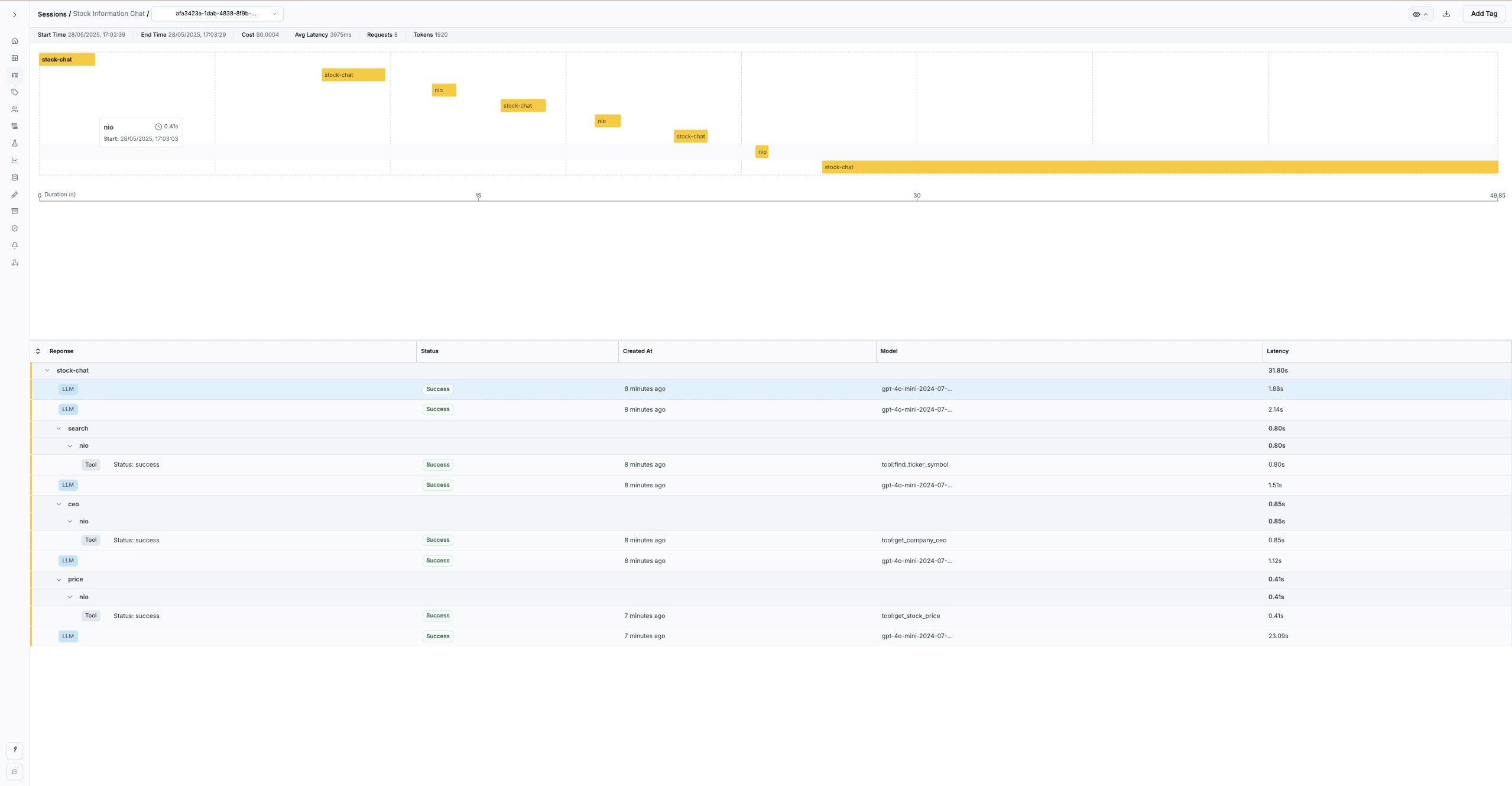
The session view shows:
- Timeline visualization of agent operations flowing from reasoning to tool execution
- Hierarchical session paths showing the flow from
/stock-chatto specific operations like/price/tsla - Individual request details with status, timing, and model information
- Complete conversation context across multiple tool calls
Each operation is logged with rich metadata:
- Tool executions show success/failure status and detailed results
- LLM reasoning calls include full conversation context
- Session paths create a logical hierarchy of operations
- Timing information helps identify performance bottlenecks
Debugging Complex Agent Interactions
Using CoreValue Sessions provides several debugging advantages:
Separate Tool Tracking
Each tool execution is logged individually, making it easy to identify which tools fail or succeed.
Rich Metadata
Tool calls include detailed input/output information and error states for comprehensive debugging.
Session Flow Visualization
See exactly how your agent chains tools together and where decision points occur.
Performance Monitoring
Track timing for both LLM reasoning and tool execution to optimize agent performance.
Complete Implementation
Next Steps
With CoreValue's Manual Logger, you have complete visibility into your agent's decision-making process. From here, you can:
- Extend the agent with more tools like news retrieval or financial analysis
- Optimize performance based on the data available in the sessions dashboard
- Debug complex interactions using session flow visualization
- Monitor production usage with detailed request tracking
Cost Tracking & Optimization
Monitor LLM spending, optimize costs, and understand unit economics across your AI application
How to Build a Multi-Model AI Assistant with Vercel AI Gateway and CoreValue
Build a customer support assistant that switches between AI models based on query complexity while tracking costs